
For busy families iPhone, Android, and web

Snap the schedule. Get your family calendar.

Add team calendar links, school flyers, and Google or Apple calendars to one shared family view, so everyone knows who’s driving to practice. Snap a schedule screenshot and review the events before they’re saved.

No card needed to see your calendar.

Or get the app

Download on the App Store Get it on Google Play

See your week free. A card is only needed when you start your trial.
$2.99/month after your 14-day free trial, cancel anytime

  • Encrypted family data
  • No ads, no data selling
  • Hide details on shared screens

Built by a dad who wanted one calendar the whole family could see. Read our story
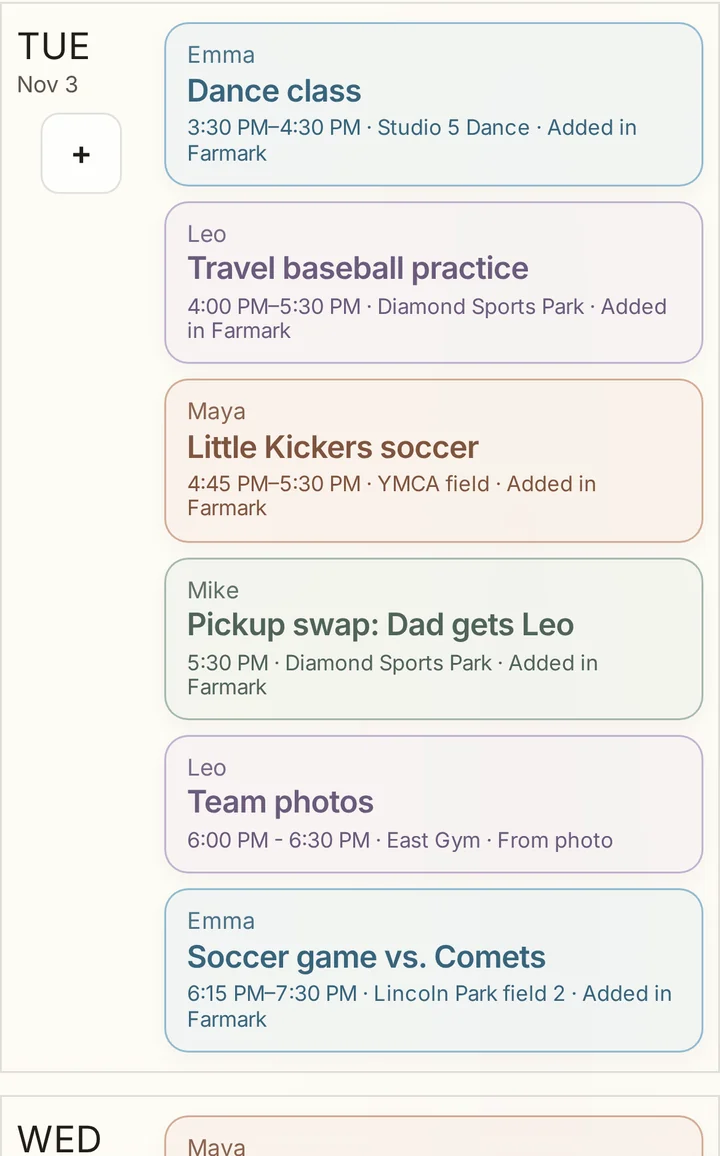
Farmark week view with color-coded events for each family member

From Farmark Families

In their own words, from parents using Farmark.

“I’m absolutely loving this calendar.”

NicoleFarmark family

“Adding sports flyers and schedules is so easy with Photo Import.”

AmberFarmark family

Built for the weeks that get away from you.

Start with the schedule that’s causing the most back-and-forth in your house.

Family Setup

See your week before you start the trial.

Name your household, add one calendar or schedule photo, and see your week. If it looks right, start the 14-day trial to edit it and keep it updating.

Start your free trial

Name your household.

Add the people who need their own calendar color. You can change them later.

Add one calendar or schedule photo.

Pick one: Google Calendar, an Apple/iCal link, a school or team calendar, an .ics file, or a photo of a schedule.

See your week.

Look over a read-only preview of the events Farmark found.

Start the trial to keep it.

The 14-day trial starts through secure checkout. Card required, no charge today. After that, Farmark is $2.99/month unless you cancel.

Fewer “what’s today?” questions.

One family view for school mornings, pickups, and everything after. Check it on your phone or leave it on a screen everyone can see.

Farmark Wall Art shown on a light household display
Glance at the day See pickups, practices, and appointments together before the day gets busy.
Farmark Wall Art shown on a dark household display
Use a screen you own Run Farmark on a tablet, monitor, computer, or browser-connected display instead of buying dedicated hardware.
Farmark mobile calendar screens shown on phones with one consistent background
Manage from your phone Add events, reminders, calendar connections, and schedule photos without taking over the home display.
Photo Schedule Import

Turn schedule photos into family calendar events.

A flyer from school. A screenshot from the coach. A PDF from camp. Add the schedule, check the details, and save the events.

  • Reads real family paperworkSports grids, school flyers, camp sheets, screenshots, and appointment cards.
  • Checks before it addsYou review every draft, fix details, and skip anything uncertain before it reaches the calendar.
  • Catches common schedule problemsConfidence labels, duplicate checks, year warnings, and person suggestions cut down on retyping.
See how Photo Import works
Farmark camera import flow adding paper schedule events to the family calendar

Use the screens you already own.

Start on your phone. Make a tablet or browser your shared home display.

Find the right display setup

On the App Store and Google Play

Install Farmark on iPhone or iPad from the App Store, or on Android phones and tablets from Google Play. Farmark also works in modern browsers on computers, TVs, and shared displays.

Private because family schedules are personal.

Kids, addresses, appointment notes, photos, and routines do not belong in an ad profile. Farmark is subscription software, not an ad network, and shared displays can hide personal details.

Hide sensitive detailsHide titles, notes, links, and locations on the shared display.
No ad businessFarmark is subscription software, not an advertising network or data broker. We do not sell family data.
Strong encryptionSensitive family information is encrypted in storage and protected during transfer.

Start with the calendar. Add what your house actually uses.

Widgets are movable cards for the things your household checks most, so Farmark can be more than a calendar without burying the schedule.

Calendar Sync †Connect Google Calendar, Apple Calendar through an iCloud/iCal link, school calendars, and other iCal/ICS feeds, then choose what appears for each person.
Photo Schedule ImportTake a picture of a school, sports, camp, or paper schedule and review the dates before adding them.
Smart SummaryHelpful notes for timing, prep, and schedule conflicts.
WeatherForecasts for planning the day.
Daily DevotionalDaily devotional and Christian holidays for families who want them.
RemindersTrash day, school items, appointments, and recurring household tasks.

$2.99/month after a 14-day trial.

Add one calendar or schedule photo and see your week before you start the 14-day trial. Card required, no charge today. Then it is $2.99/month for your household unless you cancel. No ads, no required hardware, and no separate subscription for every family member.

$2.99/month

Family Setup comes first. Secure checkout starts the trial.

Start your free trial
  • Unlimited household displays
  • Connected calendars, Photo Import, reminders, weather, and more
  • Up to 6 household members
  • No ads and no selling family data
  • $2.99/month after your 14-day free trial, cancel anytime
Download on the App Store Get it on Google Play Questions? Contact support